·23 分钟阅读·管理员
像组件一样使用svg图标
在项目中经常会使用到各式各样的图标,然鹅,每个项目的图标也许会有多个图标需要重复。比如在我的项目开发中,像系统模块类等需要的图标就有很多的重复性,如果每个项目都这样copy过来copy过去,就会比较麻烦,因此可以写一个将图标转换成组件的形式,像平时使用组件那样使用图标,话不多说,码字。。。。
所有随风而逝的都属于昨天的,所有历经风雨留下来的才是面向未来的
背景
在项目中经常会使用到各式各样的图标,然鹅,每个项目的图标也许会有多个图标需要重复。比如在我的项目开发中,像系统模块类等需要的图标就有很多的重复性,如果每个项目都这样copy过来copy过去,就会比较麻烦,因此可以写一个将图标转换成组件的形式,像平时使用组件那样使用图标,话不多说,码字。。。。
为什么使用svg?
- SVG 是矢量化的,这意味着它可以在不失真的情况下缩放到任意大小。
- Iconfont 使用的是字形,本质上是将图标编码为文本字符,因此它们可以像文字一样缩放,但可能会有锯齿效应。
介绍
fast-globfast-glob是一个用于Node.js的库,它提供了一种快速且资源高效的方式来匹配文件和目录。它主要用来处理文件系统中的文件模式匹配- 支持多种复杂的模式,包括通配符、排除模式等,并且可以返回文件的统计信息(如文件大小、修改时间等)。此外,它还提供了流式接口和异步/同步API
fs-extrafs-extra是一个非常流行的Node.js库,它扩展了Node.js标准库中的fs(文件系统)模块,提供了更丰富和更方便的文件系统操作功能。fs-extra的设计目的是为了弥补原生fs模块的一些不足,比如同步和异步方法的缺乏一致性,以及一些高级功能的缺失。
prettier- Prettier 是一个代码格式化程序。它通过解析代码并使用自己的规则重新打印代码来强制执行一致的样式,这些规则考虑了最大行长度,并在必要时包装代码。
esbuildesbuild是一个高性能的 JavaScript 编译器和打包工具,它被设计为轻量级、快速,并且特别擅长于编译和打包现代JavaScript(ES6+)代码。esbuild主要用于将源代码转换为浏览器或Node.js可以理解的格式,同时也可以用于代码压缩和模块树摇动(tree shaking)。
vue-tscvue代码类型工具
esbuild-plugin-globalsesbuild-plugin-globals是一个为esbuild设计的插件,它的主要作用是替换全局变量,使其在构建时能够被静态替换为具体的值
svgoSVGO是SVG Optimizer的缩写,是一个用于优化SVG文件SVG文件,尤其是从矢量编辑器导出的文件,通常包含大量冗余信息。这包括编辑器元数据、注释、隐藏元素、默认值或次优值,以及其他可以在不影响渲染的情况下安全删除或转换的内容。
tsx- 非typescript项目可忽略tsx代表TypeScript Execute,它是在Node.js中运行TypeScript的简单命令。
camelcase- 将破折号/点/下划线/空格分隔的字符串转换为 小驼峰 或 大驼峰
chalk- 可忽略- 美化输出样式
consola- 可忽略- 优雅的控制台包装器
- 搭配
chalk使用效果更佳
@types/fs-extra类型提示,非typescript项目可忽略@types/node类型提示,非typescript项目可忽略
bash
npm install fast-glob fs-extra esbuild vue-tsc esbuild-plugin-globals svgo tsx camelcase chalk consola @types/fs-extra @types/node --save-dev
目录结构
shell
.
|-- README.md
|-- index.html
|-- package-lock.json
|-- package.json
|-- public
|   `-- vite.svg
|-- src
|   |-- App.vue
|   |-- assets
|   |   `-- vue.svg // 后续使用打包svg测试
|   |-- components
|   |-- main.ts
|   |-- script // 脚本目录
|   |   |-- build.ts // 打包svg生成的vue代码
|   |   |-- generate.ts // svg生成vue代码脚本
|   |   `-- paths.ts // 相关路径
|   |-- style.css
|   `-- vite-env.d.ts
|-- tsconfig.app.json
|-- tsconfig.json
|-- tsconfig.node.json
`-- vite.config.ts
转换流程
- 扫描
svg目录文件,进行``svgo`格式化。 - 读取每个
svg文件内容,并获取svg文件名,作为转换的vue文件名。 - 将svg内容写入vue文件,并进行代码格式化
- 生成对应的导出入库文件
index.ts
转换vue代码
paths.ts文件
typescript
import { dirname, resolve } from 'node:path'
import { fileURLToPath } from 'node:url'

const __dirname__ = dirname(fileURLToPath(import.meta.url))
/**
 * 当前项目的根目录
 * @example project
 */
export const rootPath = resolve(__dirname__, '..', '..')
/**
 * src的目录路径
 * @example project/src
 */
export const srcPath = resolve(__dirname, '..')
/**
 * svg 转换vue代码的组件路径
 * @example project/src/components
 */
export const componentsPath = resolve(srcPath, 'components')

/**
 * 打包文件的输出路径
 * @example project/dist
 */
export const outputComponentsPath = resolve(rootPath, 'dist')
/**
 * svg所在的目录路径
 * @example project/src/assets
 */
export const svgPath = resolve(srcPath, 'assets')
generate.ts
typescript
import { emptyDir, ensureDir } from "fs-extra";
import glob  from "fast-glob";
import { readFile, writeFile } from 'node:fs/promises'
import {componentsPath, svgPath} from "./paths.ts";
import path from "node:path";
import camelcase from "camelcase";
import { type BuiltInParserName, format } from 'prettier'
import consola from "consola";
import chalk from "chalk";
/**
 * 清空指定目录
 */
const emptys = async (path: string)=>{
    await emptyDir(path)
}
/**
 * 确保目标目录存在,否则不存在将会导致报错
 * @param path
 */
const checkEnsureDir = async (path: string)=>{
    await ensureDir(path)
}
/**
 * 获取svg文件
 * @param path
 */
const getSvgFiles = async (path: string)=>{
    return glob('**/*.svg', { cwd: path, absolute: true })
}
/**
 * 根据当前文件过去其文件名称和组件名称
 * @param file
 */
const  getName = (file: string)=> {
    const filename = path.basename(file).replace('.svg', '')
    // 组件名称使用大驼峰形式
    const componentName = camelcase(filename, { pascalCase: true })
    return {
        filename,
        componentName,
    }
}

/**
 * 将vue代码格式化
 * @param code
 * @param parser
 */
const formatCode = (code: string, parser: BuiltInParserName = 'typescript') =>{
    return format(code, {
        parser,
        semi: false,
        singleQuote: true,
    })
}
const codeTransform= async (file: string) =>{
    consola.info(chalk.blue(`读取${file}内容...`))
    // 读取svg内容
    const svgContent = await readFile(file, 'utf8')
    // 根据当前文件过去其文件名称作为组件名称
    const { filename, componentName } = getName(file)
    const vueCode = await formatCode(
        `
            <template>
            ${svgContent}
            </template>
            <script lang="ts" setup>
            defineOptions({
              name: ${JSON.stringify(componentName)}
            })
            </script>`,
        'vue',
    )
    // 确保组件目标路径存在
    await checkEnsureDir(componentsPath)
    const savePath = path.resolve(componentsPath, `${filename}.vue`)
    // vue源码写入指定文件
    await writeFile(
        savePath,
        vueCode,
        'utf-8',
    )
    consola.info(chalk.green(`成功写入${savePath}...`))
}
/**
 * 生成入口文件
 */
const generateEntry = async (files: string[]) =>{
    const code = await formatCode(
        files
            .map((file) => {
                const { filename, componentName } = getName(file)
                return `export { default as ${componentName} } from './${filename}.vue'`
            })
            .join('\n'),
    )
    await writeFile(path.resolve(componentsPath, 'index.ts'), code, 'utf-8')
}
/**
 * svg转换vue
 */
const svgToVueComponent = async () =>{
    await emptys(componentsPath)
    const svgFiles = await getSvgFiles(svgPath)
    consola.info(chalk.blue('生成vue文件...'))
    await Promise.all(svgFiles.map( file => codeTransform(file)))
    consola.info(chalk.blue('生成组件入口文件...'))
    await generateEntry(svgFiles)
    consola.info(chalk.green(`转换已完成!!!`))
}
consola.info(chalk.blue('开始读取svg文件...'))
await svgToVueComponent()
添加package.josn执行脚本
json
  "scripts": {
    "generate": "tsx src/script/generate.ts",
  },
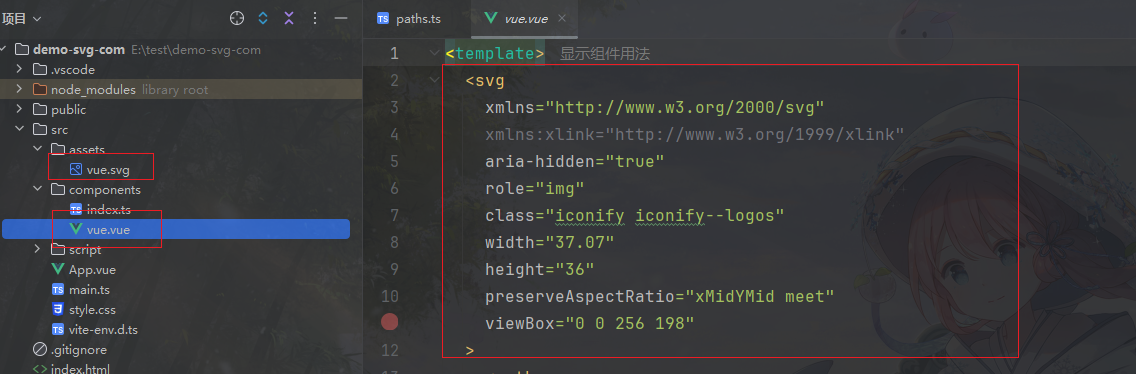
代码转换成功,如以上效果图
注意:vue.svg在后续中为了避免歧义,已改成vue-svg.svg
去除svg冗余代码
在项目根目录添加svgo配置文件svgo.config.cjs
更多配置项,请查阅官网文档
javascript
module.exports = {
  plugins: [
    //   删除宽高等属性
    'removeDimensions',
    'removeXMLProcInst',
    //   删除相关的文档类型
    'removeDoctype',
    {
      name: 'convertColors', // 将fill设置为currentColor
      params: {
        currentColor: true,
      },
    },
    //   去除svg中带有class的属性
    {
      name: 'removeAttrs',
      params: {
        attrs: "(class)"
      },
    },
  ],
}在generate.ts脚本文件添加格式化svg方法
typescript
const svgOptimize = async () => {
    const svgList = await glob('**/*.svg', {cwd: svgPath, absolute: true })
    // 这样处理的原因是,方面扩展svg目录,比如将不同的svg放到不同的目录中
    const getSvgPath = svgList.map((file) => path.dirname(file))
    getSvgPath.forEach((svgPath) => {
        const cmd = `svgo -f ${svgPath} -o ${svgPath}`
        // 执行svgo命令
        execSync(cmd, { stdio: 'inherit' })
        consola.info(chalk.blue(`格式化svg--->${svgPath} 完成!!!`))
    })
}
await svgOptimize()
await svgToVueComponent()
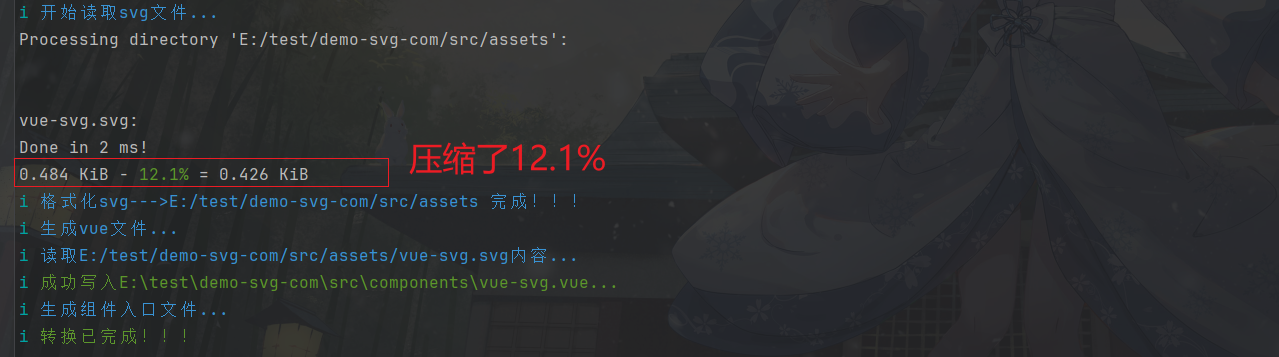
执行结果
可以看到,将svg文件进行优化后,大小由0.48到0.42减少了12.1%
构建vue代码
添加build.ts脚本文件
typescript
import path from "node:path";
import { type BuildOptions, type Format, build } from 'esbuild'
import vue from 'unplugin-vue/esbuild'
import {componentsPath, outputComponentsPath} from "./paths.ts";
import GlobalsPlugin from 'esbuild-plugin-globals'
import {emptyDir} from "fs-extra";
import consola from "consola";
import chalk from "chalk";
/**
 * 获取配置打包参数
 * @param format
 */
const getBuildOptions = (format: Format) => {
    const options: BuildOptions = {
        entryPoints: [
            path.resolve(componentsPath, 'index.ts')
        ],
        target: 'es2018',
        platform: 'neutral',
        plugins: [
            vue({
                isProduction: true,
                sourceMap: false,
                template: { compilerOptions: { hoistStatic: false } },
            }),
        ],
        bundle: true,
        format,
        minifySyntax: true,
        outdir: outputComponentsPath,
    }
    if (format === 'iife') {
        options.plugins!.push(
            GlobalsPlugin({
                vue: 'Vue',
            }),
        )
        options.globalName = 'EPIcons'
    } else {
        options.external = ['vue']
    }

    return options
}
const doBuild = async (minify: boolean) => {
    await Promise.all([
        build({
            ...getBuildOptions('esm'),
            entryNames: `[name]${minify ? '.min' : ''}`,
            minify,
        }),
        build({
            ...getBuildOptions('iife'),
            entryNames: `[name].iife${minify ? '.min' : ''}`,
            minify,
        }),
        build({
            ...getBuildOptions('cjs'),
            entryNames: `[name]${minify ? '.min' : ''}`,
            outExtension: { '.js': '.cjs' },
            minify,
        }),
    ])
}
/**
 * 构建组件
 */
const buildComponents= async () =>{
    // 清空dist
    consola.info(chalk.blue('清空打包目录 dist...'))
    await emptyDir(outputComponentsPath)
    consola.info(chalk.blue('开始构建...'))
    return Promise.all([doBuild(true), doBuild(false)])
}
await buildComponents()
consola.info(chalk.blue('构建完成!!!'))
添加package.josn执行脚本
json
  "scripts": {
    "build:components": "tsx src/script/build.ts",
  },
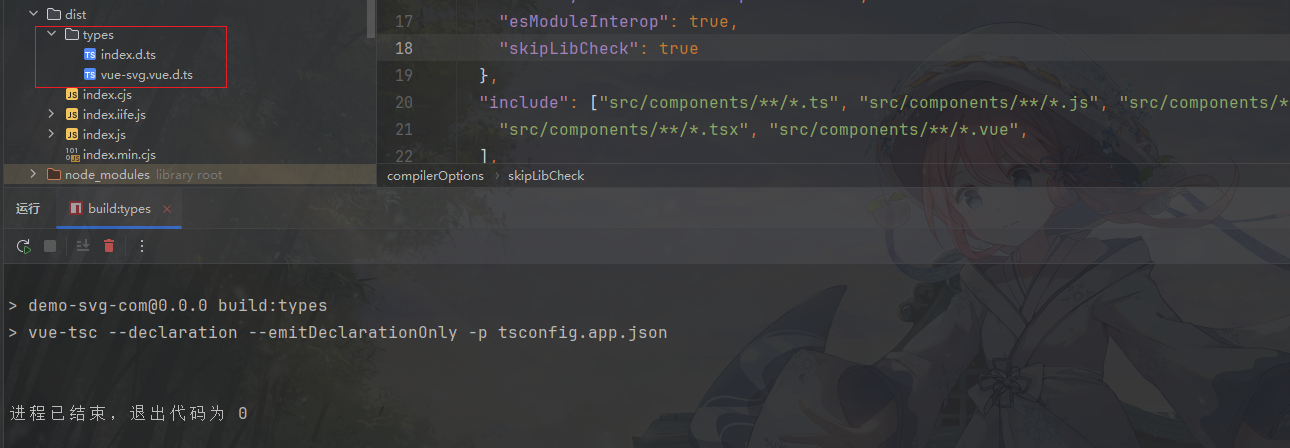
构建组件类型
json
  "scripts": {
    "build:types": "vue-tsc --declaration --emitDeclarationOnly -p tsconfig.app.json",// 指定tsconfig.json文件
  },
json
// tsconfig.app.json
{
  "compilerOptions": {
    "target": "ES2018",
    "jsx": "preserve",
    "lib": ["ES2018", "DOM"],
    "baseUrl": ".",
    "module": "ESNext",
    "moduleResolution": "node",
    "types": [],
    "strict": true,
    "noImplicitAny": true,
    "declaration": true,
    "declarationDir": "dist/types",
    "emitDeclarationOnly": true,
    "sourceMap": true,
    "allowSyntheticDefaultImports": true,
    "esModuleInterop": true,
    "skipLibCheck": true
  },
  "include": ["src/components/**/*.ts", "src/components/**/*.js", "src/components/**/*.d.ts",
    "src/components/**/*.tsx", "src/components/**/*.vue",
  ],
  "exclude": ["node_modules", "dist"]
}
执行效果
测试
配置package.json,添加类型引入文件
json
{
"files": ["dist"],
  "main": "./dist/index.cjs",
  "module": "./dist/index.js",
  "types": "./dist/types/index.d.ts",
  "exports": {
    ".": {
      "types": "./dist/types/index.d.ts",
      "require": "./dist/index.cjs",
      "import": "./dist/index.js"
    },
    "./*": "./*"
  },
}
本地调试
使用yalc调试
- 安装
bash
npm install -g yalcbuild打包后yalc发布
bash
#发布
yalc publishyalc安装组件包
bash
yalc add demo-svg-com- 其他命令使用,请自行官网了解
vue
<script setup lang="ts">
import { VueSvg } from 'demo-svg-com'
</script>

<template>
  <div>
    <i style="color: blue;width: 36px;height: 36px; display: inline-flex" class="icon">
      <VueSvg></VueSvg>
    </i>
  </div>
</template>

<style scoped>
</style>